Architecting Enterprise AI: The Lattice Platform (Part 4)

Disclaimer: This series is a personal, educational reference architecture. All diagrams, opinions, and frameworks are my own and are not affiliated with, sponsored by, or representative of my employer. I’m publishing it on my own time and without using any confidential information.
© 2026 Sean Miller. All rights reserved.
From Engine to Boundary
The Orchestration Engine runs workflows. It sequences tool calls, model calls, and human checkpoints into governed, replayable execution graphs. But when a workflow step says “look up this customer” or “process this refund,” the engine doesn’t talk to databases or payment systems directly. It dispatches through the Tool Gateway: the governed execution boundary between AI workflows and enterprise systems.
Every tool call in Lattice passes through this boundary. The Tool Gateway validates identity, enforces role-based access control, checks idempotency, logs audit events, and applies timeouts before any enterprise system is touched. The Orchestration Engine decides what to do. The Tool Gateway decides whether you’re allowed and how it gets done safely.
An uncontrolled tool call is the fastest path to corrupted production data. The Tool Gateway exists to make that impossible.
Why the Tool Gateway Exists
Uncontrolled tool execution fails in three ways.
First, ungoverned tool access. An LLM hallucinates a function name or invents arguments. Without a registry and schema validation layer, that hallucinated call goes directly to production. The Tool Gateway rejects any call that doesn’t match a registered tool with a validated schema.
Second, no identity propagation. The AI workflow invokes tools as a service account. There’s no per-user RBAC, no human-linked audit trail, and no way to answer “who authorized this action?” after the fact. The Tool Gateway propagates the original user’s identity through every tool call, enforcing access control at two layers and linking every execution to a specific human.
Third, no idempotency guarantees. Retry logic in the orchestrator fires the same tool call twice. Without idempotency protection, that means duplicate refunds, duplicate notifications, duplicate escalations. The Tool Gateway maintains both an HTTP-level cache for reads and a database-level action log for writes, preventing duplicate side effects.
Tool Gateway Responsibilities
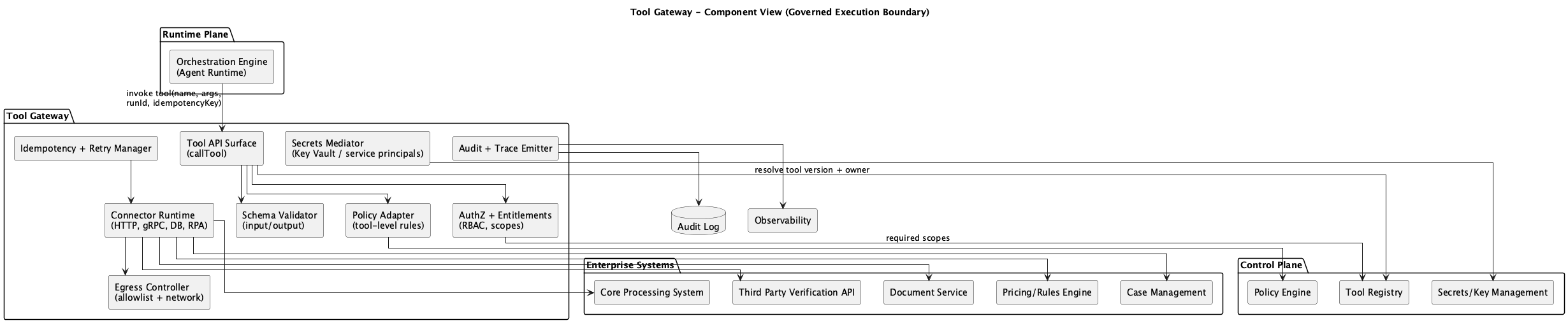 Figure 1: Tool Gateway Component Diagram
The Tool Gateway owns the following components:
Tool API Surface (callTool): The single entry point for all tool execution. Every request flows through this endpoint regardless of the calling service.
AuthZ + Entitlements: Two-layer RBAC enforcement. Layer 1 checks role membership against the tool’s required roles. Layer 2 checks contextual access: case ownership, customer relationships, and data sensitivity.
Schema Validator: Validates tool inputs against registered JSON schemas before execution. Rejects malformed or unexpected arguments.
Policy Adapter: Applies runtime policy constraints from the Control Plane. Tool allowlists, data scope limits, and risk tier enforcement.
Connector Runtime (HTTP, gRPC, DB, RPA): Executes the actual tool call against the target enterprise system. Supports multiple protocols and enforces timeouts.
Idempotency + Retry Manager: Two-layer duplicate prevention. HTTP-level caching for idempotent reads, database-level action logging for non-idempotent writes.
Secrets Mediator: Retrieves credentials from the key vault at execution time. Credentials are never stored in the Tool Gateway itself.
Egress Controller: Controls outbound network access. The Tool Gateway can only reach approved endpoints.
Audit + Trace Emitter: Produces structured audit events for every tool execution. Started, completed, and failed events with correlation IDs linking back to the orchestrator run.
Tool Gateway Explicit Non-Responsibilities
The Tool Gateway should not:
- Contain business logic (that belongs in workflows and tool handlers)
- Orchestrate multi-step workflows (that’s the Orchestration Engine)
- Run model inference (that’s the Model Gateway)
- Provision identities or handle authentication (that’s the AI Gateway and identity provider)
- Interact directly with users (that’s the AI Gateway’s session layer)
This separation keeps the Tool Gateway focused on its core job: governed, auditable, safe tool execution.
Inside the Tool Gateway
Each architectural component maps to a concrete file in the implementation:
- Tool Registry (
registry/tools.ts): Available tools, schemas, risk tiers, handlers - Tool Handlers (
registry/tool-handlers.ts): Execution logic with contextual RBAC at data layer - RBAC Middleware (
middleware/rbac.ts): Two-layer access control - Idempotency Manager (
middleware/idempotency.ts): Duplicate write prevention - Execute Route (
routes/execute.ts): Full execution pipeline - Tools Route (
routes/tools.ts): Discovery API - Telemetry Middleware (
middleware/telemetry.ts): Structured logging, correlation IDs
Tool Registration
The Tool Definition Contract
Every tool in the registry is defined by a ToolDefinition contract. This contract captures the tool’s identity, risk profile, access requirements, and execution behavior.
// Illustrative pseudocode for a reference architecture
interface ToolDefinition {
    id: string;                    // Unique tool identifier
    name: string;                  // Human-readable name
    description: string;           // What this tool does
    version: string;               // Semantic version
    riskTier: RiskTier;            // 'low' | 'medium' | 'high'
    inputSchema: object;           // JSON Schema for input validation
    outputSchema: object;          // JSON Schema for output shape
    requiredScopes: string[];      // OAuth scopes required
    requiredRoles?: string[];      // RBAC roles required
    timeout: number;               // Execution timeout in ms
    idempotent: boolean;           // Safe to retry without side effects
    handler?: (input, userContext) => Promise<unknown>;
}
The riskTier field drives governance behavior. Low-risk tools execute immediately. Medium-risk tools require elevated roles. High-risk tools require specific roles and should trigger human-in-the-loop approval in production. The idempotent flag determines which idempotency layer applies: HTTP cache for idempotent tools, database action log for non-idempotent ones.
Built-in Tools
The reference implementation includes 11 tools across three risk tiers:
Low risk (any role):
get_case_data(idempotent): Retrieve case informationget_customer_data(idempotent): Retrieve customer profileget_subscription_data(idempotent): Retrieve subscription detailstransfer_case: Transfer case to another agentclose_case: Close a resolved casesend_customer_notification: Send email, SMS, or pushcreate_follow_up_case: Create follow-up case
Medium risk (elevated roles):
get_customer_payments(idempotent, finance/senior_agent/executive): Retrieve payment historyescalate_case(senior_agent/executive): Escalate to higher priority
High risk (restricted roles):
process_refund(finance/executive, non-idempotent): Process a customer refundupdate_customer_tier(executive only, non-idempotent): Change subscription tier
The high-risk entries are where governance matters most. process_refund moves money. update_customer_tier changes billing. Both require specific roles, both are non-idempotent (the action log prevents duplicates), and both should trigger human approval before execution in production environments.
Two-Layer RBAC
RBAC in the Tool Gateway operates at two layers. Layer 1 is a coarse gate that checks role membership. Layer 2 is a contextual check that evaluates the relationship between the user, the resource, and the action.
Layer 1: Basic Role Check
The first layer runs on every tool call. It’s fast and cheap: check whether the user’s role appears in the tool’s requiredRoles list.
// Illustrative pseudocode for a reference architecture
function checkRBAC(tool: ToolDefinition, userContext?: UserContext) {
    // If tool has no role requirements, allow
    if (!tool.requiredRoles || tool.requiredRoles.length === 0) {
        return { allowed: true };
    }

    // If no user context provided, deny
    if (!userContext) {
        return { allowed: false, error: { code: 'RBAC_DENIED' } };
    }

    // Check if user's role is in the tool's required roles
    if (!tool.requiredRoles.includes(userContext.role)) {
        return {
            allowed: false,
            error: {
                code: 'RBAC_DENIED',
                message: `Tool requires: ${tool.requiredRoles.join(', ')}. User has: ${userContext.role}`,
                requiredRoles: tool.requiredRoles,
                userRole: userContext.role,
            },
        };
    }

    return { allowed: true };
}
This layer catches the obvious violations. An agent role calling process_refund gets rejected before the system does any work. But role membership alone is not enough.
Layer 2: Contextual RBAC
The second layer evaluates relationships between the user and the specific resource being accessed. Having the agent role doesn’t mean you can access every case. You can only access cases assigned to you, unless you’re a supervisor.
// Illustrative pseudocode for a reference architecture
function checkContextualRBAC(toolId, userContext, rbacContext) {
    // Rule 1: Case ownership
    // User must be assigned to the case OR be a supervisor
    if (rbacContext.caseId && rbacContext.caseAssignedTo !== undefined) {
        const isAssigned = rbacContext.caseAssignedTo === userContext.userId;
        const isSupervisor = SUPERVISOR_ROLES.includes(userContext.role);
        if (!isAssigned && !isSupervisor) {
            return { allowed: false, reason: 'cross_agent_access' };
        }
    }

    // Rule 2: Customer data via case context
    // Agents need an associated case to access customer data
    if (rbacContext.customerId && toolId === 'get_customer_data') {
        if (!CUSTOMER_ACCESS_ROLES.includes(userContext.role)) {
            if (!rbacContext.caseId) {
                return { allowed: false, reason: 'customer_access_without_case' };
            }
        }
    }

    // Rule 3: Payment data requires finance role
    if (toolId === 'get_customer_payments') {
        if (!FINANCE_ROLES.includes(userContext.role)) {
            return { allowed: false, reason: 'finance_data_access' };
        }
    }

    // Rule 4: Refunds require finance role only
    if (toolId === 'process_refund') {
        if (userContext.role !== 'finance') {
            return { allowed: false, reason: 'refund_authorization' };
        }
    }

    // Rule 5: Tier changes require executive role only
    if (toolId === 'update_customer_tier') {
        if (userContext.role !== 'executive') {
            return { allowed: false, reason: 'tier_change_authorization' };
        }
    }

    return { allowed: true };
}
Five enforcement rules, each with a specific reason code. When a denial happens, the audit log captures exactly which rule blocked the call and why. This makes compliance reviews straightforward: every denial is traceable.
Field-Level Redaction
RBAC is not binary allow/deny. In the Tool Gateway, the shape of the response changes based on the caller’s role. A finance user calling get_customer_data sees the full record. An agent sees redacted PII.
// Illustrative pseudocode for a reference architecture
// From the get_customer_data handler
const canSeePII = userContext
    && ['finance', 'executive', 'senior_agent'].includes(userContext.role);

return {
    customerId: customer.id,
    email: canSeePII ? customer.email : '[REDACTED]',
    firstName: canSeePII ? customer.first_name : customer.first_name.charAt(0) + '***',
    lastName: canSeePII ? customer.last_name : customer.last_name.charAt(0) + '***',
    company: customer.company,
    tier: customer.tier,
};
The same pattern applies to subscription data: non-finance roles see the tier and status but not the monthlyAmount. Governance is embedded in the response itself. The tool succeeds for both roles. The data it returns is different.
Processing a Tool Call
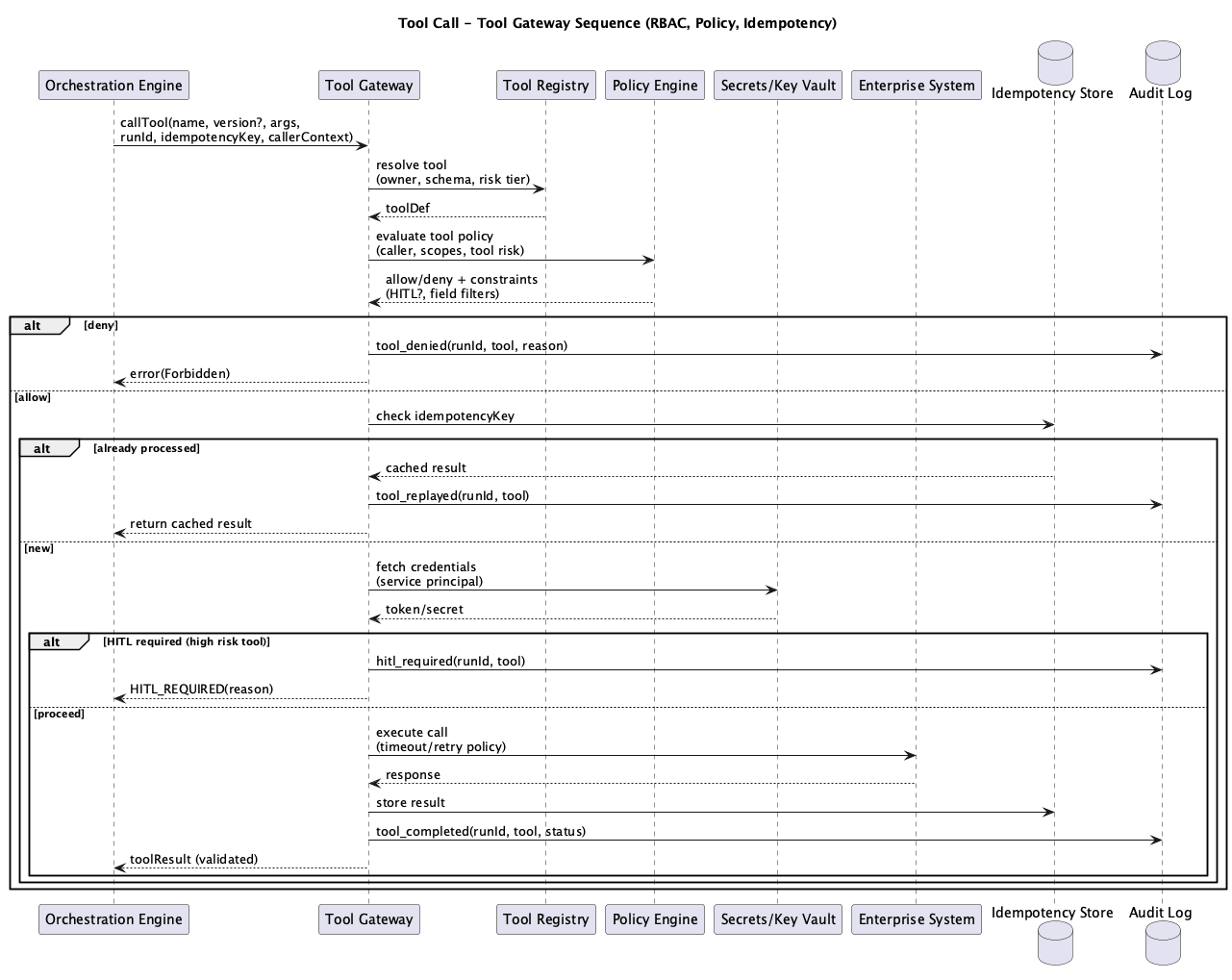 Figure 2: Tool Gateway Execution Sequence
A tool call passes through several phases between the orchestrator’s request and the final response.
Request Intake: The orchestrator calls POST /v1/tools/:toolId/execute with the tool input, user context, correlation ID, and optional idempotency key. The execute route resolves the tool from the registry. If the tool doesn’t exist, the request fails with TOOL_NOT_FOUND.
Policy Evaluation: The RBAC middleware runs the basic role check (Layer 1). If the tool requires roles that the user doesn’t have, the request fails with RBAC_DENIED and a 403 status. Contextual RBAC (Layer 2) runs inside the handler, where the system has access to the specific resource being requested.
Idempotency Check: For non-idempotent tools, the execute route checks the database action log for recent executions of the same action on the same target. If a duplicate is detected within the idempotency window, the request fails with IDEMPOTENCY_VIOLATION and a 409 status. For idempotent tools with an X-Idempotency-Key header, the HTTP cache returns the previous result immediately.
Credential Fetch: The Secrets Mediator retrieves the necessary credentials from the key vault. Credentials are scoped to the specific connector and never cached in the Tool Gateway.
HITL Gate: For high-risk tools (process_refund, update_customer_tier), the system pauses execution and requests human approval. The Checkpoint Manager in the Orchestration Engine handles the approval flow and resumes execution when granted.
Execution: The Connector Runtime invokes the tool handler with a timeout enforced via Promise.race. If the handler exceeds the configured timeout, the execution fails with a timeout error.
Result Processing: On success, the result is cached (if idempotent), the action is logged (if non-idempotent), audit events are emitted, and the response is returned with correlation ID and latency metrics.
Idempotency: Two Layers
HTTP-Level: Cache for Reads
The first idempotency layer operates at the HTTP level. When the orchestrator sends an X-Idempotency-Key header and the tool is marked idempotent, the result is cached in memory and returned on subsequent calls with the same key.
// Illustrative pseudocode for a reference architecture
// From the execute route
if (idempotencyKey) {
    const cached = idempotencyCache.get(idempotencyKey);
    if (cached) {
        return {
            correlationId,
            toolId,
            cached: true,
            result: cached.result,
            latencyMs: Date.now() - startTime
        };
    }
}

// After successful execution, cache for idempotent tools
if (idempotencyKey && tool.idempotent) {
    idempotencyCache.set(idempotencyKey, { result, timestamp: Date.now() });

    // Auto-evict entries older than 1 hour
    const oneHourAgo = Date.now() - 3600000;
    for (const [key, value] of idempotencyCache) {
        if (value.timestamp < oneHourAgo) {
            idempotencyCache.delete(key);
        }
    }
}
This layer is fast and lightweight. It prevents redundant read calls from hitting the database during retries or parallel execution.
Database-Level: Action Log for Writes
The second layer is authoritative. For non-idempotent tools (writes), the system checks the action_logs table for recent executions of the same action type on the same target.
// Illustrative pseudocode for a reference architecture
// From the idempotency middleware
async function checkIdempotency(actionType, targetType, targetId, userContext, windowMs = 60000) {
    // Only check for write operations
    const writeActions = [
        'processRefund', 'escalateCase', 'transferCase',
        'closeCase', 'updateCustomerTier', 'sendCustomerNotification',
        'createFollowUpCase',
    ];

    if (!writeActions.includes(actionType)) {
        return { isDuplicate: false };
    }

    // Check action_logs for recent execution on this target
    const recentActions = await getRecentCaseActions(targetId, actionType, userContext);
    if (recentActions.length > 0) {
        const timeSinceLastAction = Date.now() - new Date(recentActions[0].created_at).getTime();
        if (timeSinceLastAction < windowMs) {
            return { isDuplicate: true, recentActionId: recentActions[0].id };
        }
    }

    return { isDuplicate: false };
}
When a duplicate write is detected, the Tool Gateway returns a 409 Conflict with the ID of the recent action and the time since it executed. The orchestrator can decide how to handle it: skip the step, wait and retry, or escalate to a human. The HTTP cache handles the fast path. The database log is the authoritative guard against duplicate side effects.
Orchestrator Integration
The Orchestration Engine communicates with the Tool Gateway through a typed client. This client handles identity propagation, idempotency keys, and error preservation.
// Illustrative pseudocode for a reference architecture
class ToolClient {
    async execute(request: ExecuteRequest): Promise<ExecuteResponse> {
        const headers = {
            'Content-Type': 'application/json',
            'X-Correlation-ID': request.correlationId,
        };

        // Propagate identity for RBAC enforcement
        if (request.userContext) {
            headers['X-User-Id'] = request.userContext.userId;
            headers['X-User-Role'] = request.userContext.role;
            headers['X-User-Department'] = request.userContext.department;
        }

        // Propagate idempotency key for duplicate prevention
        if (request.idempotencyKey) {
            headers['X-Idempotency-Key'] = request.idempotencyKey;
        }

        const response = await fetch(
            `${TOOL_GATEWAY_URL}/v1/tools/${request.toolId}/execute`,
            { method: 'POST', headers, body: JSON.stringify({ input, userContext }) }
        );

        // Propagate errors: RBAC denials, idempotency violations, timeouts
        // The orchestrator handles these appropriately
        if (!response.ok) {
            throw new Error(errorData.error?.message ?? `Tool execution failed`);
        }

        return { toolId, result: data.result, cached: data.cached, latencyMs: data.latencyMs };
    }
}
Three design choices are critical here. Identity propagation via headers (X-User-Id, X-User-Role, X-User-Department) ensures the Tool Gateway enforces RBAC against the original human user, not the orchestrator’s service account. Idempotency key propagation enables the orchestrator to safely retry tool calls without duplicate side effects. Error propagation ensures RBAC denials and other governance failures bubble up to the orchestrator, which can return “access denied” to the user or trigger a different workflow path.
Tool Gateway Setup
Directory Structure
services/packages/tool-gateway/
  src/
    index.ts                      # Hono app initialization
    routes/
      execute.ts                  # POST /v1/tools/:toolId/execute
      tools.ts                    # GET /v1/tools, GET /v1/tools/:toolId
      health.ts                   # Health check endpoint
    middleware/
      rbac.ts                     # Two-layer RBAC enforcement
      idempotency.ts              # Duplicate write prevention
      telemetry.ts                # Structured logging
      error.ts                    # Centralized error handling
    registry/
      tools.ts                    # ToolDefinition contract + registry
      tool-handlers.ts            # Handler implementations with contextual RBAC
    __tests__/
      rbac.test.ts                # RBAC enforcement test suite
API Surface
Three endpoints cover tool discovery and execution:
GET /v1/tools: List all registered tools with schemas and risk tiersGET /v1/tools/:toolId: Get details for a specific toolPOST /v1/tools/:toolId/execute: Execute a tool with RBAC, idempotency, and audit
Anatomy of an Execution
The execute route is the core pipeline. Every tool call passes through these steps in order:
// Illustrative pseudocode for a reference architecture
executeRouter.post('/:toolId/execute', async (c) => {
    // 1. Extract correlation ID and idempotency key from headers
    const correlationId = c.req.header('X-Correlation-ID') ?? generateId();
    const idempotencyKey = c.req.header('X-Idempotency-Key');

    // 2. Check HTTP-level idempotency cache (fast path for reads)
    if (idempotencyKey && idempotencyCache.has(idempotencyKey)) {
        return cached result;
    }

    // 3. Resolve tool from registry
    const tool = toolRegistry.get(toolId);
    if (!tool) return 404;

    // 4. Extract user context from headers and body
    const userContext = extractUserContext(c);

    // 5. Layer 1 RBAC: basic role check
    const rbacCheck = checkRBAC(tool, userContext);
    if (!rbacCheck.allowed) return 403;

    // 6. Database-level idempotency check (for non-idempotent writes)
    if (targetId && !tool.idempotent) {
        const idempotencyCheck = await checkIdempotency(toolId, targetType, targetId);
        if (idempotencyCheck.isDuplicate) return 409;
    }

    // 7. Emit audit event: tool_execution_started
    await logAuditEvent({ eventType: 'tool_execution_started', ... });

    // 8. Execute with timeout enforcement
    const result = await Promise.race([
        tool.handler(input, userContext),  // Layer 2 RBAC runs inside handler
        timeoutPromise
    ]);

    // 9. Cache result or log action for idempotency tracking
    if (tool.idempotent) cacheResult();
    else await logActionForIdempotency();

    // 10. Emit audit event: tool_execution_completed
    await logAuditEvent({ eventType: 'tool_execution_completed', ... });

    return { correlationId, toolId, result, latencyMs };
});
Steps 5 and 8 are the two RBAC layers. Step 5 is the coarse gate at the route level. Step 8 runs the handler, which performs contextual RBAC against the specific resource before returning data. Both layers must pass for the tool call to succeed.
Audit Trail
Every tool execution produces structured audit events. These events flow to the shared audit log and telemetry store.
A normal execution produces two events:
{
    "eventType": "tool_execution_started",
    "service": "tool-gateway",
    "action": "get_case_data",
    "userId": "agent_042",
    "userRole": "agent",
    "targetType": "tool",
    "targetId": "get_case_data",
    "correlationId": "corr_abc123",
    "details": { "input": "{\"caseId\":\"case_789\"}" },
    "success": true
}
{
"eventType": "tool_execution_completed",
"service": "tool-gateway",
"action": "get_case_data",
"userId": "agent_042",
"userRole": "agent",
"targetType": "tool",
"targetId": "get_case_data",
"correlationId": "corr_abc123",
"details": { "cached": false },
"success": true,
"latencyMs": 47
}An RBAC denial produces a failure event with a reason code:
{
    "eventType": "tool_execution_failed",
    "service": "tool-gateway",
    "action": "process_refund",
    "userId": "agent_042",
    "userRole": "agent",
    "targetType": "tool",
    "targetId": "process_refund",
    "correlationId": "corr_def456",
    "success": false,
    "error": "Tool process_refund requires one of: finance, executive. User has role: agent",
    "latencyMs": 2
}
The correlationId links every tool execution back to the orchestrator run that initiated it. Auditors can trace a workflow from the AI Gateway request through orchestration steps to individual tool calls, seeing exactly who did what, when, and whether it succeeded.
Interactive Demo
What’s Next
The next post covers The Context Builder: the retrieval and grounding layer that assembles context for model calls. It covers document retrieval, PII redaction before model consumption, citation assembly, and why grounding is essential for trustworthy AI outputs.
Series Roadmap
This series will explore each component of the Lattice architecture in depth:
- What Each Component Actually Is — The implementation decoder ring
- Introduction to Lattice — The Five Planes overview
- The AI Gateway — Front door and policy enforcement
- The Orchestration Engine — Workflows, not agents
- The Tool Gateway (this post) — Governed access to enterprise systems
- The Context Builder — Retrieval, redaction, and grounding
- The Model Gateway — Routing, cost control, and structured outputs
- The Control Plane — Policy, registries, and change management
- The Data Plane — Indexes, stores, and session state
- The Ingestion Plane — Document processing and embeddings
- MCP Integration — Standardized interoperability
- Preventing Hallucinations — Architectural approaches to grounding
- Lattice-Lite — A lighter approach for small orgs
- Putting It Together — End-to-end request lifecycle
This series documents architectural patterns for enterprise AI platforms. Diagrams and frameworks are provided for educational purposes.