Architecting Enterprise AI: The Lattice Platform (Part 2)
Disclaimer: This series is a personal, educational reference architecture. All diagrams, opinions, and frameworks are my own and are not affiliated with, sponsored by, or representative of my employer. I’m publishing it on my own time and without using any confidential information.
© 2026 Sean Miller. All rights reserved.
Prologue
Before we talk about the AI Gateway within the Runtime Plane, we must first define the Experience Plane. The Experience Plane is the user-facing layer of the architecture that directly interacts with the AI Gateway. For a chatbot, it might be a standalone web or mobile app, or a chat window embedded into an existing product. For an automated insights generation tool, it might be a workflow run on a cron job that schedules data refresh.
The interaction surface between the Experience Plane and the Runtime Plane is the AI Gateway: the front door to any enterprise AI platform. When you make an API call, say POST /v1/ai/turn, the Experience Plane passes along a pre-defined set of parameters like attachments, context, model, and prompt that the API contract expects. The AI Gateway then routes the request to the Orchestration Engine, which manages workflow execution.
Think of the AI Gateway like an API gateway, but with workflow routing, session state, AI-specific governance, and standardized output baked in. It is more than a simple, opinionated, and unified API surface. It is responsible for the enforcement of:
- who can call what (identity, RBAC, entitlements)
- what is allowed to happen (policy checks, workflow allowlists, tool constraints, HITL triggers)
- how state persists (session lifecycle, conversation summaries, correlation IDs)
- how responses look everywhere (schemas, citations, actions, safety flags)
- how you observe and audit everything (tracing, telemetry, replay)
AI Gateway Responsibilities
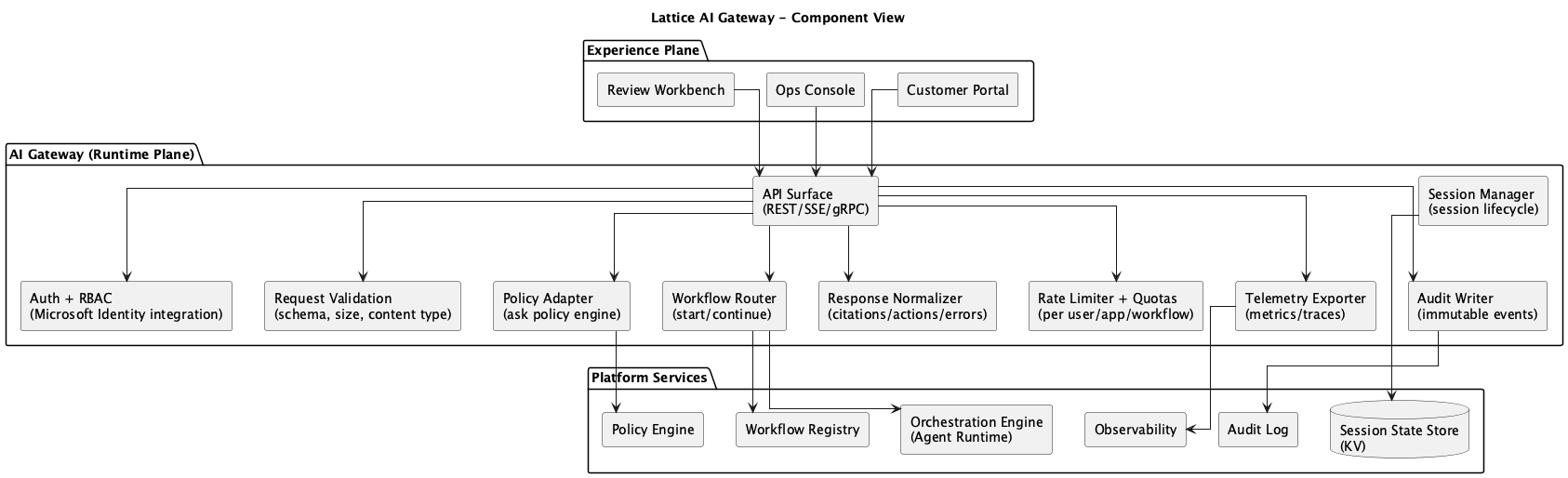 Figure 1: AI Gateway Component Diagram
The AI Gateway is responsible for both AuthN (authentication) and AuthZ (authorization). It handles interaction with the identity provider, as well as the policy store, both of which are managed in the control plane.
In practice, a stripped down AuthN request looks like passing the user’s JWT token to the identity provider, which returns a set of claims; if the user is not authenticated, the request is rejected and the Experience Plane is responsible for handling the error in a user-friendly way.
The AuthZ component looks for the user’s entitlements, i.e. whether they are allowed to perform the requested action based on the policy store, and returns a boolean decision and reason code. The AuthZ responsibility is also deeply tied to request validation, rate limiting, and abuse protection.
The AI Gateway is on the front lines for session management and context budgeting, though it is not building the session state and context itself. The session state itself is compiled by the Orchestration Engine during workflow execution, but the AI Gateway is responsible for the ingestion of session events, the correlation of the session ID with the session lifecycle, and the writes of session history into the session state store.
Lastly, the gateway normalizes and formats the responses from the Orchestration Engine to a consistent contract, which includes the schema of the response, citations, actions, safety flags, and telemetry hints. Such telemetry and audit events are streamed at every step of the interaction.
AI Gateway Explicit Non-Responsibilities
The AI Gateway should not be responsible for:
- Business logic for processing or ops (handled by the Experience Plane)
- Ad hoc prompt engineering per product (handled by the Experience Plane)
- Direct DB access or tool execution (handled by the Tool Gateway)
- Model-specific glue scattered across products (handled by the Orchestration Engine)
This delineation ensures a clean contract between the Experience Plane and the Runtime Plane, promoting modularity and separation of concerns.
Processing Interactions
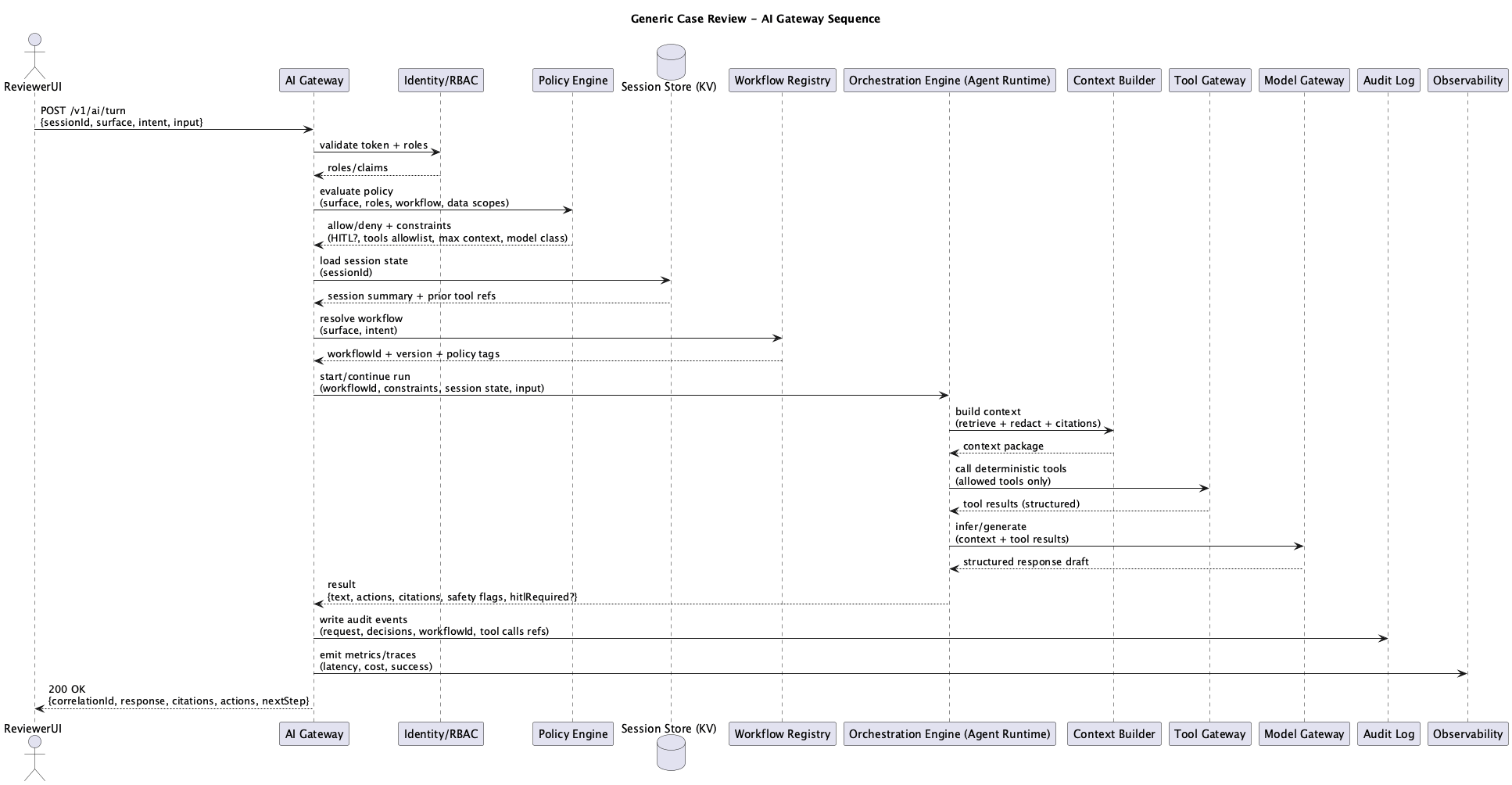 Figure 2: AI Gateway Sequence Diagram
A request from the Experience Plane to the AI Gateway is a turn that performs the aforementioned checks, then calls the Orchestration Engine to execute a workflow. The Orchestration Engine kicks off deterministic context building, tooling interactions, and model inference through the Model Gateway.
The Orchestration Engine returns the structured response back to the AI Gateway, which streams (or passes, depending on the implementation) the response back to the Experience Plane. Once a response has been received, the AI Gateway writes audit events to the shared audit log in the runtime plane, as well as metrics and detailed traces to the telemetry store that is used by the enterprise’s chosen observability stack.
API Surface and Contract(s)
Example API contracts shown below are illustrative only and do not represent a production or deployed service.
POST /v1/ai/turn: Handles one conversational turn. Takes sessionId, surface, input, returns normalized AI response.POST /v1/ai/workflows/{workflowId}:run: Non-conversational. Run a workflow for a case/recordId with structured input.GET /v1/ai/sessions/{sessionId}: Returns session metadata and last known state, not raw sensitive content.POST /v1/ai/feedback: Captures thumbs up/down, corrections, reason codes for eval.
And the response contract should always include:
- correlationId
- workflowId + version
- text
- citations (doc refs, policy refs, tool refs)
- actions (structured next steps)
- safetyFlags + humanReviewRequired
- telemetryHints (optional)
Interactive Demo
All workflows, tools, audit events, and telemetry shown in the demo are simulated using mock data.
The demo is a simple React web app built with React Flow for the node-based diagrams and mock data to simulate the request lifecycle. No backend required.
AI Gateway Setup
Platform Directory Structure
A production Lattice implementation organizes services by responsibility. Here’s how the packages map to the architectural components:
services/packages % tree -L 1
.
├── ai-gateway          # Runtime Plane: Front door, auth, session, telemetry
├── orchestrator        # Runtime Plane: Workflow execution, agent runtime
├── context-builder     # Runtime Plane: Retrieval, redaction, citations
├── tool-gateway        # Runtime Plane: Governed tool execution
├── model-gateway       # Runtime Plane: Model routing, cost controls
├── control-plane       # Control Plane: Policy engine, registries
├── core                # Shared types, clients, utilities
└── dashboard           # Ops experience surface
AI Gateway Directory Structure
The AI Gateway itself consists of middleware, routes, and services:
services/packages/ai-gateway % tree
.
├── Dockerfile
├── package.json
├── src
│   ├── index.ts
│   ├── middleware
│   │   ├── auth.ts         # AuthN/AuthZ, identity extraction
│   │   ├── error.ts        # Centralized error handling
│   │   └── telemetry.ts    # Correlation IDs, tracing, metrics
│   ├── routes
│   │   ├── feedback.ts     # POST /v1/ai/feedback
│   │   ├── health.ts       # Health checks
│   │   ├── session.ts      # GET /v1/ai/sessions/:id
│   │   ├── turn.ts         # POST /v1/ai/turn
│   │   └── workflow.ts     # POST /v1/ai/workflows/:id:run
│   └── services
│       ├── orchestrator-client.ts  # Client for Orchestration Engine
│       └── session.ts              # Session state management
└── tsconfig.json
Anatomy of a Turn
The most important file in the AI Gateway is routes/turn.ts. This is the barebones of the architecture where a user’s input becomes an AI response.
// Illustrative pseudocode for a reference architecture (not production code).
// routes/turn.ts - The core request handler
turnRouter.post('/turn', async (c) => {
    const correlationId = c.get('correlationId');
    const identity = c.get('identity');
    const startTime = Date.now();

    // 1. Validate request against schema
    const body = await c.req.json();
    const request = TurnRequestSchema.parse(body);

    // 2. Get or create session (for multi-turn conversations)
    const session = await sessionManager.getOrCreate(
        request.sessionId,
        request.surface,
        identity.id
    );

    // 3. Route to appropriate workflow based on surface + input
    const workflowId = await routeToWorkflow(request.surface, request.input.text);

    // 4. Execute workflow via orchestrator (THE HANDOFF)
    const result = await orchestratorClient.executeWorkflow({
        workflowId,
        sessionId: session.sessionId,
        correlationId,
        input: {
            userInput: request.input.text,
            attachments: request.input.attachments,
            surface: request.surface,
            constraints: request.constraints
        },
        caller: {
            userId: identity.id,
            scopes: identity.scopes
        }
    });

    // 5. Record turn in session history
    await sessionManager.recordTurn(session.sessionId, {
        role: 'user',
        content: request.input.text,
        timestamp: new Date().toISOString()
    });

    // 6. Build normalized response
    const response: AIResponse = {
        correlationId,
        sessionId: session.sessionId,
        runId: result.runId,
        workflowId,
        text: result.text,
        citations: result.citations ?? [],
        actions: result.actions ?? [],
        safetyFlags: result.safetyFlags ?? [],
        humanReviewRequired: result.humanReviewRequired ?? false,
        telemetry: {
            tokensUsed: result.tokensUsed ?? 0,
            costUsd: result.costUsd ?? 0,
            modelsUsed: result.modelsUsed ?? [],
            toolsUsed: result.toolsUsed ?? []
        },
        latencyMs: Date.now() - startTime
    };

    return c.json(response);
});
This snippet is intentionally simplified to illustrate responsibilities and handoffs within the AI Gateway.
// services/orchestrator-client.ts - The handoff
async executeWorkflow(request: WorkflowExecuteRequest): Promise<WorkflowExecuteResult> {
    const response = await fetch(`${ORCHESTRATOR_URL}/v1/execute`, {
        method: 'POST',
        headers: {
            'Content-Type': 'application/json',
            'X-Correlation-ID': request.correlationId
        },
        body: JSON.stringify({
            workflowId: request.workflowId,
            sessionId: request.sessionId,
            input: request.input,
            constraints: request.constraints
        })
    });

    const data = await response.json();
    return {
        runId: data.runId,
        text: data.text,
        citations: data.citations ?? [],
        // ... normalized from orchestrator response
    };
}
The gateway doesn’t know or care what the orchestrator does internally. It could be a simple prompt, a multi-step agent, or a complex workflow with tool calls and human checkpoints. The contract is the same.
What’s Next
In the next post, we’ll deep dive into The Orchestration Engine and explore how it manages workflow execution deterministically, serving as the backbone of a governed AI platform.
Series Roadmap
This series will explore each component of the Lattice architecture in depth:
- What Each Component Actually Is — The implementation decoder ring
- Introduction to Lattice — The Five Planes overview
- The AI Gateway (this post) — Front door and policy enforcement
- The Orchestration Engine — Workflows, not agents
- The Tool Gateway — Governed access to enterprise systems
- The Context Builder — Retrieval, redaction, and grounding
- The Model Gateway — Routing, cost control, and structured outputs
- The Control Plane — Policy, registries, and change management
- The Data Plane — Indexes, stores, and session state
- The Ingestion Plane — Document processing and embeddings
- MCP Integration — Standardized interoperability
- Preventing Hallucinations — Architectural approaches to grounding
- Lattice-Lite — A lighter approach for small orgs
- Putting It Together — End-to-end request lifecycle
This series documents architectural patterns for enterprise AI platforms. Diagrams and frameworks are provided for educational purposes.