Super Simple Steps: Embeddings & Semantic Search (Part 4)

Disclaimer: This series documents patterns and code from building Thrifty Trip, my personal side project. All code examples, architectural decisions, and opinions are my own and are not related to my employer. Code is provided for educational purposes under the Apache 2.0 License.
In Part 3, we introduced the pattern for multimodal input by sending images alongside text to enrich item analysis.
This post introduces the pattern for embedding generation and semantic search: converting text into a vector that can be used for similarity search.
We will be using Supabase Edge Functions to generate the embeddings and store them in a Supabase Vector Database.
The Text Search Challenge
One of the most common features we take for granted is the ability to search for items. This seems like a simple construct to the user, but behind the scenes has historically been fraught with extreme complexity, long algorithms, dedicated engineering teams, and expensive infrastructure.
Within the reseller community, not all items are listed the same. For example:
- A pair of Levi’s 501 jeans can have an item title “Levis Blue Jeans Size 30 501s”.
- A pair of Nike Air Jordan 11 shoes could be “AJ11 Size 8.5”
- A vintage Burberry trench coat could be “Trench Size Small”
All of these items are the same product, but the titles make simple word similarity search difficult and prone to managing an ever-expanding list of edge cases.
The Solution: Embedding Generation and Semantic Search
Semantic search is a way to search for items using the meaning of words, rather than just the words themselves. Semantic search uses embeddings under the hood, which is the conversion of text into a vector that can be used for similarity search. A very elementary summary:
- Semantic search uses the cosine similarity algorithm to compare the similarity of two vectors: the search query and the item’s embedding.
- An embedding is a vector of floating point numbers that represent the meaning of the text. The higher the cosine similarity, the more similar the two vectors are.
- Ex.
[0.01861819,-0.014005003,...,0.02636895]with a length of 384.
- Ex.
- A vector is a list of numbers. If you remember your linear algebra (or Calculus 3), a vector is a point in a multi-dimensional space. Each dimension captures learned semantic features, not individual words, but abstract patterns the model discovered during training.
- Embedding Vectors are generated by LLMs and require you to specify the size of the vector, e.g.
384 dimensional vector. Most importantly, comparing embeddings generated by different models is like comparing apples to oranges. You must use the same model to compare embeddings.
Figure 1: The semantic search similarity comparison.
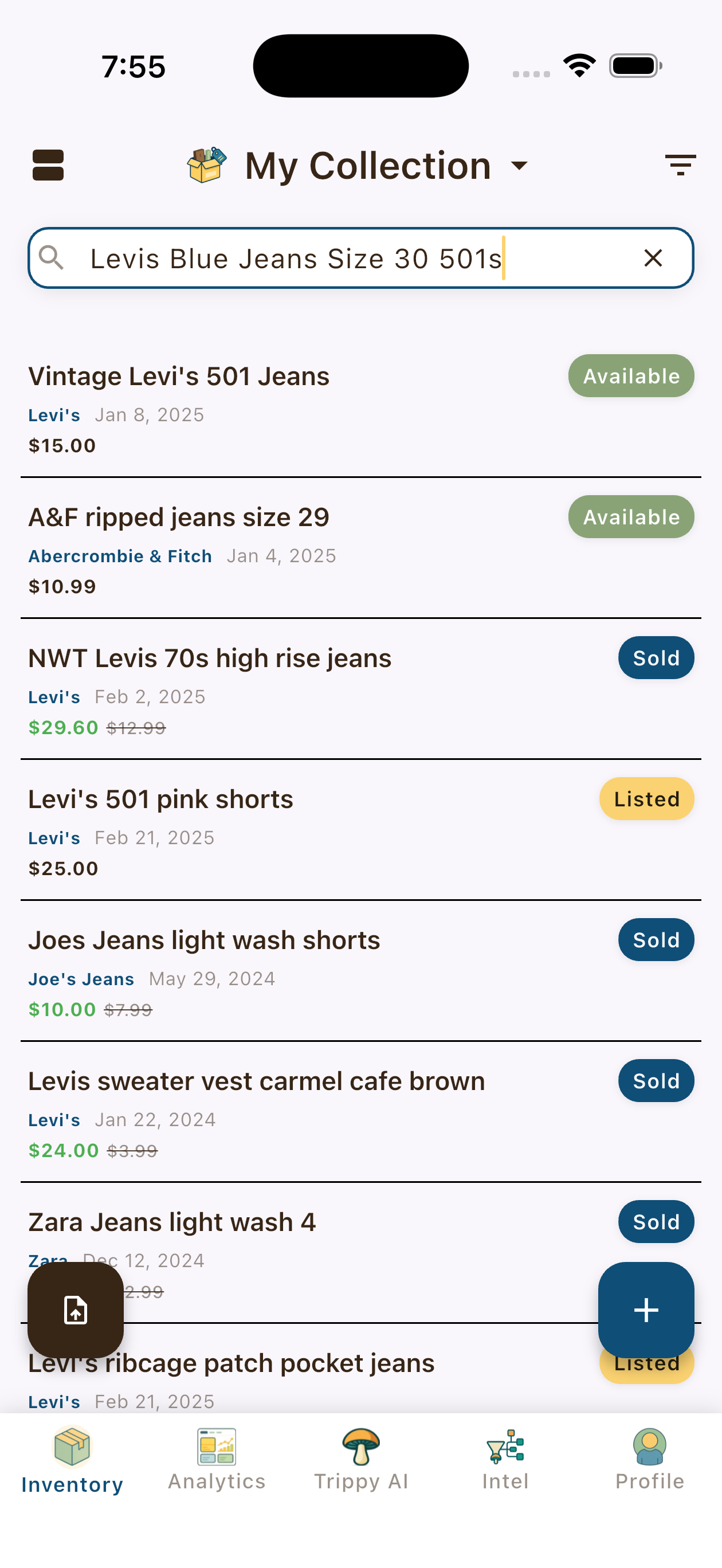
Semantic search will match “Levi’s 501 jeans” with “Levis Blue Jeans Size 30 501s” with a high degree of confidence.
Implementation
Step 1: Setup The Database Schema Migration
A database schema is required to store the embeddings. A simplified schema for the inventory items is used for this example.
/*
 * Copyright 2026 Thrifty Trip LLC
 * SPDX-License-Identifier: Apache-2.0
 */

-- Create the vector extension
CREATE EXTENSION IF NOT EXISTS "vector" WITH SCHEMA "extensions";

CREATE TABLE IF NOT EXISTS public.inventory_items (
  id uuid NOT NULL DEFAULT gen_random_uuid (),
  title text NOT NULL,
  description text NULL,
  category text NULL,
  brand text NULL,
  notes text NULL,
  sku text NULL,
  size text NULL,
  embedding extensions.vector NULL,
  CONSTRAINT inventory_items_pkey PRIMARY KEY (id)
) TABLESPACE pg_default;

CREATE INDEX IF NOT EXISTS inventory_items_embedding_idx ON public.inventory_items USING hnsw (embedding extensions.vector_ip_ops) TABLESPACE pg_default;

-- Create the database function to queue the embedding generation for new or updated items
CREATE OR REPLACE FUNCTION queue_embedding_generation() RETURNS TRIGGER AS $$
BEGIN
  -- Only queue for relevant changes
  IF (
    TG_OP = 'INSERT' OR
    (TG_OP = 'UPDATE' AND (
      NEW.title IS DISTINCT FROM OLD.title OR
      NEW.description IS DISTINCT FROM OLD.description OR
      NEW.category IS DISTINCT FROM OLD.category OR
      NEW.brand IS DISTINCT FROM OLD.brand OR
      NEW.notes IS DISTINCT FROM OLD.notes OR
      NEW.sku IS DISTINCT FROM OLD.sku OR
      NEW.size IS DISTINCT FROM OLD.size
    ))
  ) THEN
    -- Insert into queue (or update if already exists)
    INSERT INTO public.embedding_queue (inventory_item_id, status, priority)
    VALUES (NEW.id, 'pending', 0)
    ON CONFLICT (inventory_item_id)
    DO UPDATE SET
      status = 'pending',
      retry_count = 0,
      updated_at = now(),
      last_error = null
    WHERE embedding_queue.status != 'processing'; -- Don't reset if currently processing
  END IF;
  -- Return the new or old row
  RETURN COALESCE(NEW, OLD);
END;
$$;

-- Create the trigger to queue the embedding generation for new or updated items
CREATE TRIGGER queue_embeddings_trigger
AFTER INSERT OR UPDATE ON inventory_items FOR EACH ROW
EXECUTE FUNCTION queue_embedding_generation();
What the SQL snippet does:
- Creates the vector extension (required for vector operations)
- Creates the inventory_items table with the required fields
- Creates the inventory_items_embedding_idx index using the hnsw algorithm (a type of index that is optimized for similarity search)
- An index is a precomputed data structure that allows for faster retrieval of data, critical for large datasets.
- HNSW (Hierarchical Navigable Small World Graph) is a data structure that is optimized for similarity search. It is a graph-based index that is optimized for the cosine similarity metric.
- An amazing resource for understanding HNSW in detail is this blog post
- Creates the
queue_embedding_generationfunction to queue the embedding generation for new or updated items - Creates the
queue_embeddings_triggertrigger to queue the embedding generation for new or updated items
Step 2: Declarations
We use the Gemini Batch Embeddings API to generate the embedding.
The next step is to declare your constants and interfaces. For example, we need to declare the model we are using, the dimensions of the embedding, and the API url. We also need to declare the database schema with the fields we need to embed.
/*
 * Copyright 2026 Thrifty Trip LLC
 * SPDX-License-Identifier: Apache-2.0
 */

// Environment variables
const SUPABASE_URL = Deno.env.get("SUPABASE_URL") ?? "";
const DB_SERVICE_ROLE_KEY = Deno.env.get("SUPABASE_SERVICE_ROLE_KEY") ?? "";
const GEMINI_API_KEY = Deno.env.get("GEMINI_API_KEY") ?? ""; // DO NOT store in source code. Always use environment variables.

// Gemini embedding config
const EMBEDDING_MODEL = "gemini-embedding-001";
const OUTPUT_DIMENSIONALITY = 384; // Match market_price_data for cross-table similarity
const BATCH_EMBED_URL = `https://generativelanguage.googleapis.com/v1beta/models/${EMBEDDING_MODEL}:batchEmbedContents`;

// Processing limits
const DEFAULT_BATCH_SIZE = 100; // Max texts per batchEmbedContents call
const DEFAULT_TOTAL_LIMIT = 500; // Total items to process per function call
const MAX_TOTAL_LIMIT = 2000; // Safety limit to avoid overwhelming the API

// Database schema with fields we need to embed
interface InventoryItemRow {
  id: string;
  title: string | null;
  description: string | null;
  category: string | null;
  brand: string | null;
  notes: string | null;
  sku: string | null;
  size: string | null;
}

// Gemini API request interface
interface EmbeddingRequest {
  model: string;
  content: { parts: { text: string }[] };
  outputDimensionality?: number;
}

// Gemini API batch request interface. It is an array of EmbeddingRequest objects.
interface BatchEmbedRequest {
  requests: EmbeddingRequest[];
}

// Gemini API response interface determined by the API contract.
interface EmbeddingResponse {
  embeddings: Array<{ values: number[] }>;
}

// CORS headers for cross-origin requests
const corsHeaders = {
  "Access-Control-Allow-Origin": "*",
  "Access-Control-Allow-Headers": "authorization, x-client-info, apikey, content-type",
};

function jsonResponse(data: unknown, status = 200): Response {
  return new Response(JSON.stringify(data), {
    status,
    headers: { ...corsHeaders, "Content-Type": "application/json" }
  });
}

async function countRemainingItems(supabase: ReturnType<typeof createClient>): Promise<number> {
  const { count } = await supabase
    .from("inventory_items")
    .select("*", { count: "exact", head: true })
    .is("embedding", null)
    .eq("is_deleted", false);
  return count ?? 0;
}
Note: The jsonResponse function is a helper function that returns a JSON response with the appropriate headers.
Step 3: Define an Embedding Corpus Aggregator
The embedding corpus aggregator is responsible for aggregating the items into a batch of items to process.
/*
 * Copyright 2026 Thrifty Trip LLC
 * SPDX-License-Identifier: Apache-2.0
 */

function buildEmbeddingText(row: InventoryItemRow): string {
    const parts = [
    row.title,
    row.description,
    row.category,
    row.brand,
    row.notes,
    row.sku,
    row.size
    ].filter(Boolean);

    return parts.join(" ").trim();
}
This function is simple: it takes in an InventoryItemRow object, concatenates its contents, and returns the result. We use the filter(Boolean) to remove any null or undefined values.
Step 4: Define a Function to Process a Batch of Items
The function to process a batch of items is responsible for calling the Gemini Batch Embeddings API and storing the embeddings in the database.
/*
 * Copyright 2026 Thrifty Trip LLC
 * SPDX-License-Identifier: Apache-2.0
 */

async function processBatch(
  supabase: ReturnType<typeof createClient>,
  rows: InventoryItemRow[] // The embedding corpus from buildEmbeddingText
): Promise<{ success: number; failed: number; errors: string[] }> {
    const result = { success: 0, failed: 0, errors: [] as string[] };

    // Initialize the texts with the inventory UUID and the text to embed
    const textsWithIds: Array<{ id: string; text: string }> = [];

    for (const row of rows) {
        const text = buildEmbeddingText(row);
        if (text) {
            textsWithIds.push({ id: row.id, text });
        } else {
            result.failed++;
            result.errors.push(`No content for ${row.id}`);
        }
    }

    if (textsWithIds.length === 0) {
        return result; // If no items to process, return the result.
    }

    // Define the final batch request to the embeddings API.
    const batchRequest: BatchEmbedRequest = {
        requests: textsWithIds.map(item => ({
            model: `models/${EMBEDDING_MODEL}`,
            content: { parts: [{ text: item.text }] },
            outputDimensionality: OUTPUT_DIMENSIONALITY
        }))
    };

    // Call Gemini batchEmbedContents API
    const response = await fetch(`${BATCH_EMBED_URL}?key=${GEMINI_API_KEY}`, {
    method: "POST",
    headers: { "Content-Type": "application/json" },
    body: JSON.stringify(batchRequest)
    });

    if (!response.ok) {
    const errorText = await response.text();
    throw new Error(`Gemini API error (${response.status}): ${errorText}`);
    }

    const embedResponse: EmbeddingResponse = await response.json();

    if (!embedResponse.embeddings || embedResponse.embeddings.length !== textsWithIds.length) {
      throw new Error(`Embedding count mismatch: expected ${textsWithIds.length}, got ${embedResponse.embeddings?.length || 0}`);
    }

    // Update database with embeddings
    for (let i = 0; i < textsWithIds.length; i++) {
      const { id } = textsWithIds[i];
      const embedding = embedResponse.embeddings[i].values;

      try {
          const { error: updateError } = await supabase
          .from("inventory_items")
          .update({
              embedding,
              updated_at: new Date().toISOString()
          })
          .eq("id", id);

          if (updateError) {
          result.failed++;
          result.errors.push(`Update failed for ${id}: ${updateError.message}`);
          } else {
          result.success++;
          }
      } catch (updateErr) {
          result.failed++;
          result.errors.push(`Update exception for ${id}: ${updateErr}`);
      }
    }

    return result;
}
This function:
- Initializes a batch array of items with the corpus text from
buildEmbeddingText()along with the inventory id for positive return matching. - If there are no items to process, returns the result, effectively skipping the embedding process. This is a crucial safety check for long-running cron jobs.
- It maps the BatchEmbedRequest interface to the EmbeddingRequest, which is the API call format specified by the Gemini API.
- It uses the
fetchAPI which allows us to retrieve the JSON response asynchronously. - It updates the database with the embeddings.
Step 5: Define a Process Action for Embedding Generation
The Gemini Batch Embeddings API is a POST request to the batchEmbedContents endpoint. We call this function asynchronously to avoid blocking the main thread and timing out the request.
/*
 * Copyright 2026 Thrifty Trip LLC
 * SPDX-License-Identifier: Apache-2.0
 */

async function handleProcess(
    supabase: ReturnType<typeof createClient>, // We inject the Supabase client in the function call to avoid passing it as a parameter to every function that needs it.
    body: { limit?: number; batch_size?: number; force?: boolean; user_id?: string },
    startTime: number
) {
    const totalLimit = Math.min(body.limit || DEFAULT_TOTAL_LIMIT, MAX_TOTAL_LIMIT); // We pass a total limit in the function call
    const batchSize = Math.min(body.batch_size || DEFAULT_BATCH_SIZE, 100); // We pass a batch size to avoid timing out the request
    const force = body.force || false; // If true, re-embed ALL items (for model migration)
    const userId = body.user_id; // Optional: only process specific user's items

    // Build query definition
    let query = supabase
    .from("inventory_items")
    .select("id, title, description, category, brand, notes, sku, size")
    .eq("is_deleted", false); // We filter out deleted items to avoid processing them

    // If not forcing, only get items without embeddings to avoid processing items that already have valid embeddings
    if (!force) {
    query = query.is("embedding", null);
    }

    // Filter by user if specified
    if (userId) {
    query = query.eq("user_id", userId);
    }

    // Run the query and fetch the items for processing. If there is an error, throw it.
    const { data: rows, error: fetchError } = await query.limit(totalLimit);

    // Handle fetch error. Currently, we only log the error.
    if (fetchError) {
    throw new Error(`Failed to fetch inventory items: ${fetchError.message}`);
    }

    // Handle no items found
    if (!rows || rows.length === 0) {
    return jsonResponse({
        success: true,
        message: force ? "No items to re-embed" : "All items already have embeddings",
        processed: 0,
        duration_ms: Date.now() - startTime
    });
    }

    // Process in batches
    let totalSuccess = 0;
    let totalFailed = 0;
    const errors: string[] = [];

    for (let i = 0; i < rows.length; i += batchSize) {
        const batch = rows.slice(i, i + batchSize);
        const batchNum = Math.floor(i / batchSize) + 1;
        const totalBatches = Math.ceil(rows.length / batchSize);

        try {
            const result = await processBatch(supabase, batch);
            totalSuccess += result.success;
            totalFailed += result.failed;
            if (result.errors.length > 0) {
            errors.push(...result.errors.slice(0, 3));
            }
        } catch (batchError) {
            const errorMsg = batchError instanceof Error ? batchError.message : String(batchError);
            errors.push(`Batch ${batchNum}: ${errorMsg}`);
            totalFailed += batch.length;
        }

        // Small delay between batches to avoid rate limiting
        if (i + batchSize < rows.length) {
            await new Promise(resolve => setTimeout(resolve, 100));
        }
    }

    // Log the duration of the process for metrics and debugging.
    const duration = Date.now() - startTime;

    return jsonResponse({
    success: true,
    processed: totalSuccess + totalFailed,
    successful: totalSuccess,
    failed: totalFailed,
    errors: errors.slice(0, 10),
    duration_ms: duration,
    items_remaining: await countRemainingItems(supabase)
    });
}
This function performs the bulk of the database and processing ops. The process:
- Define limits for the total number of items to process and the batch size. These can be invoked at runtime using the format
{"limit": <number>, "batch_size": <number>}. - Define a for loop to process the items in batches to avoid time outs.
- Within the loop, call the
processBatchfunction to invoke the embedding generation w/ Gemini. - Return a result object containing the number of successful and failed embeddings.
Step 6: Define the Function
/**
 * Copyright 2026 Thrifty Trip LLC
 * SPDX-License-Identifier: Apache-2.0
 *
 * Batch Inventory Embeddings Edge Function
 *
 * Regenerates inventory item embeddings using Gemini embedding model
 * to match the market_price_data embeddings for cross-table similarity search.
 *
 * Actions:
 * - status: Check embedding progress
 * - process: Process items without embeddings or all items (force=true)
 * - process with force=true: Re-embed ALL items (for model migration)
 */
Deno.serve(async (req) => {
  if (req.method === "OPTIONS") {
    return new Response("ok", { headers: corsHeaders });
  }

  const startTime = Date.now();

  try {
    const supabase = createClient(SUPABASE_URL, DB_SERVICE_ROLE_KEY);
    const body = await req.json().catch(() => ({}));
    const action = body.action || "status";

    switch (action) {
      case "process":
        return await handleProcess(supabase, body, startTime);
      case "status":
        return await handleStatus(supabase, startTime);
      default:
        return jsonResponse({
          error: `Unknown action: ${action}. Use: process, status`
        }, 400);
    }

  } catch (error) {
    return jsonResponse({
      success: false,
      error: error instanceof Error ? error.message : String(error),
      duration_ms: Date.now() - startTime
    }, 500);
  }
});
The function declaration allows us to call the embedding generation w/ the process action and check the progress w/ the status action. Such a function should not be exposed to the client, but rather scheduled as a cron job. This pattern is detailed in Step 1.
# Example curl call
curl -L -X POST 'https://<YOUR_PROJECT_ID>.supabase.co/functions/v1/batch-inventory-embeddings' \
  -H 'Authorization: Bearer <YOUR_SERVICE_ROLE_KEY>' \
  -H 'Content-Type: application/json' \
  --data '{"action":"process", "limit": 100, "batch_size": 10, "force": false, "user_id": "123"}'
Step 7: Define a Semantic Search DB Function
/*
 * Copyright 2026 Thrifty Trip LLC
 * SPDX-License-Identifier: Apache-2.0
 */

CREATE FUNCTION public.search_inventory_semantic(
  query_embedding vector,
  match_threshold double precision DEFAULT 0.7,  -- Minimum similarity score (0-1)
  search_user_id uuid DEFAULT NULL,
  result_limit integer DEFAULT 20
)
RETURNS TABLE (
  id uuid,
  user_id uuid,
  title text,
  brand text,
  category text,
  purchase_price numeric,
  target_price numeric,
  actual_sold_price numeric,
  status public.item_status,
  images jsonb,
  size text,
  description text,
  notes text,
  sku text,
  created_at timestamptz,
  updated_at timestamptz,
  similarity double precision       -- Similarity score (higher = more similar)
)
LANGUAGE sql
STABLE
AS $$
  SELECT
    i.id,
    i.user_id,
    i.title,
    i.brand,
    i.category,
    i.purchase_price,
    i.target_price,
    i.actual_sold_price,
    i.status,
    i.images,
    i.size,
    i.description,
    i.notes,
    i.sku,
    i.created_at,
    i.updated_at,
    (1 - (i.embedding <=> query_embedding))::double precision AS similarity
  FROM public.inventory_items i
  WHERE
    -- Security: require user_id (replaces RLS for SECURITY INVOKER functions)
    i.user_id = search_user_id
    -- Only items with embeddings
    AND i.embedding IS NOT NULL
    -- Similarity threshold filter
    AND (1 - (i.embedding <=> query_embedding)) >= match_threshold
    -- Exclude soft-deleted items
    AND i.is_deleted = false
  -- Order by distance ascending (closest first)
  ORDER BY i.embedding <=> query_embedding
  LIMIT result_limit;
$$;
An important note on the <=> operator. It’s a vector similarity operator offered by PGVector that returns the cosine distance between two vectors.
- Convert cosine distance to similarity score
- Distance range: 0 (identical) to 2 (opposite)
- Similarity: 1 - distance, so range -1 to 1
Step 8: Define a Worker Function to Embed the Search Query and Invoke the DB Function
Since the search query itself needs to be embedded, we’ll define another edge function to handle that.
Note: this is an excerpt from the full semantic search function in Thrifty Trip. Declarations, AuthN/AuthZ, and error handling are omitted for brevity.
/*
 * Copyright 2026 Thrifty Trip LLC
 * SPDX-License-Identifier: Apache-2.0
 */

async function performSemanticSearch(
  supabase: any,
  query: string,
  userId?: string,
  limit = 20,
  threshold = 0.9
): Promise<any[]> {

  // Generate embedding using Gemini API (matching inventory_items model)
  const embedRequest = {
    model: `models/${EMBEDDING_MODEL}`,
    content: { parts: [{ text: query }] },
    outputDimensionality: OUTPUT_DIMENSIONALITY
  };

  const response = await fetch(`${EMBED_URL}?key=${GEMINI_API_KEY}`, {
    method: "POST",
    headers: { "Content-Type": "application/json" },
    body: JSON.stringify(embedRequest)
  });

  if (!response.ok) {
    const errorText = await response.text();
    console.error('Gemini API error:', response.status, errorText);
    throw new Error(`Gemini embedding failed: ${errorText}`);
  }

  const embedResponse: GeminiEmbedResponse = await response.json();
  const queryEmbedding = embedResponse.embedding?.values;

  if (!queryEmbedding || !Array.isArray(queryEmbedding)) {
    throw new Error('Failed to generate query embedding');
  }

  // Perform semantic search using database function
  const { data, error } = await supabase.rpc('search_inventory_semantic', {
    query_embedding: queryEmbedding,
    match_threshold: threshold,
    search_user_id: userId,
    result_limit: limit
  });

  if (error) {
    throw new Error(`Semantic search failed: ${error.message}`);
  }

  return data || [];
}
The semantic search function:
- Generates an embedding for the search query
- Invokes the
search_inventory_semanticDB function to perform the similarity search - Returns a table of results
Results in Production
In Thrifty Trip, this enables our users to search for their inventory items using natural, imprecise language.
How It All Fits Together
The following diagram illustrates how every component in the embedding and semantic search pipeline interacts:
Figure 2: Complete embedding generation and semantic search architecture.
The two main flows:
-
Embedding Generation (left path): User creates/updates an item → trigger queues it → edge function batches items → Gemini generates embeddings → vectors stored back in database
-
Semantic Search (right path): User enters search query → edge function embeds the query → cosine similarity compared against HNSW index → database function returns ranked results
Key Takeaways
- Embeddings are a vector representation of media: text, images, audio, video, etc.
- Both database records and search queries can be embedded.
- Two embeddings can be compared to determine their similarity via semantic search.
- A match threshold can be set to filter out results that are not similar enough (trial and error to find the right threshold).
- Results can be ordered by similarity (closest first).
What’s Next
We’ve established the foundation for using AI to develop features: text generation, structured output, multimodal input, and embeddings.
In the next post, “Super Simple Steps: Grounding & Search,” we’ll explore how to connect AI to real-time information from the web w/ Gemini’s grounding features.
Series Roadmap
- Generative AI — The basic primitive
- Structured Output — Prompt version control & Zod schemas
- Multimodal Input — Processing images with AI
- Embeddings & Semantic Search (this post) — Finding similar items
- Grounding & Search — Connecting AI to real-time data
- The Batch API — Processing thousands of items efficiently
- Building an AI Agent — Giving AI tools to solve problems
- Evaluating Success — Testing and measuring quality
This series documents real patterns from building Thrifty Trip, a production inventory management app for fashion resellers. Code samples are available under the Apache 2.0 License.